Use case for valuers
How to prepare a bank valuation report, step by step.
From the bank’s assignment to a signed report and a paid invoice, here is every step of the valuation process, and how Valzy does the finding, retyping and formatting so you can focus on the valuation.
Free for 10 days. IBBI-registered valuers are approved instantly.
1 Intake
- Assignment from bank panel
- Khata read, fields extracted
- Property located on the map
2 Desk valuation
- Locality analysed
- Guideline value found
- Comparables and adjustments
- Land and building value
3 Site visit
- Visit sent to field engineer
- Photos and measurements saved
4 Report and billing
- Bank format pre-filled
- Reviewed and signed
- Invoice raised
Illustrative assignment. You review every figure and sign the report.
Phase 1 · Intake
Assignment in, documents read, property found.
The first hour of a report used to go on calls, retyping and searching. Now it starts with the documents already read.
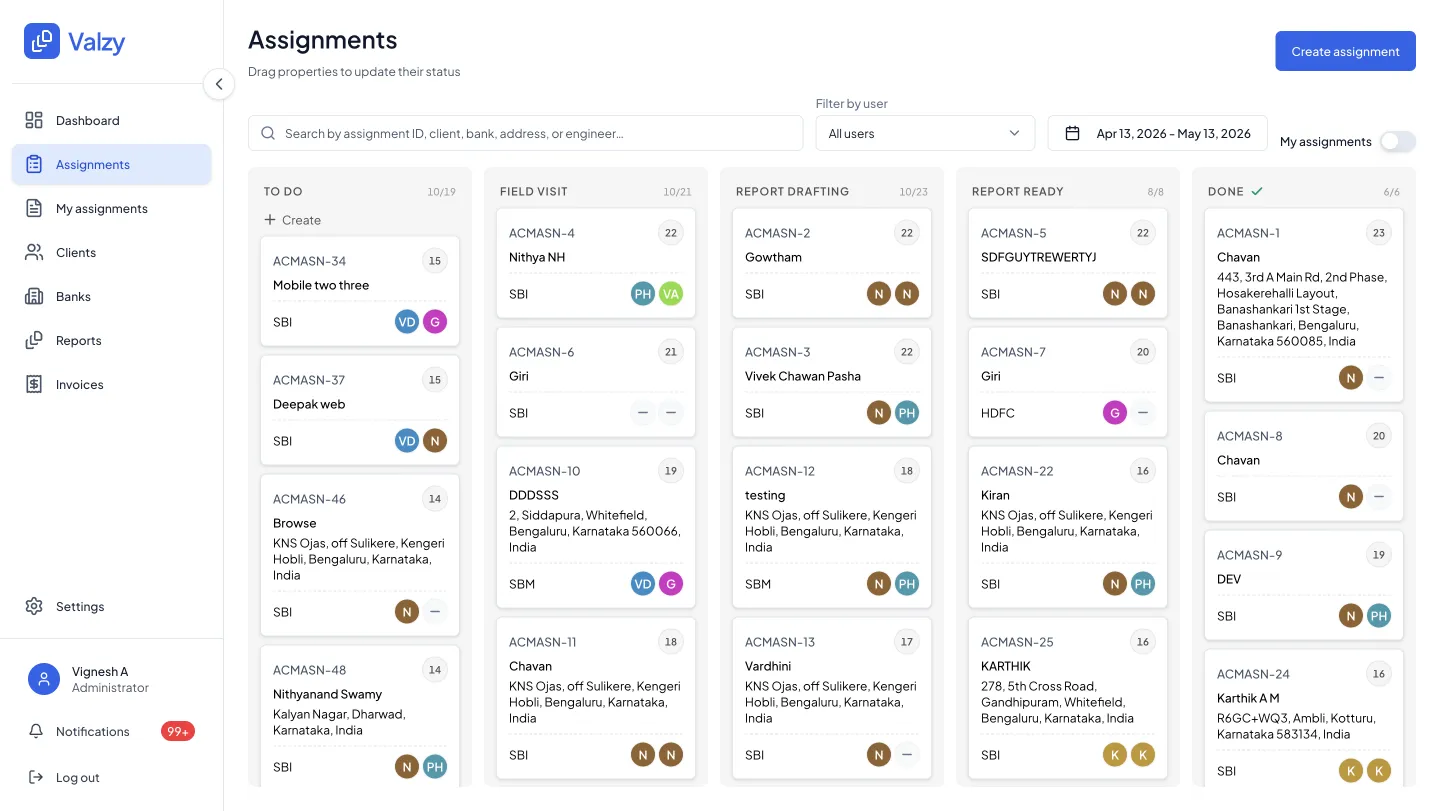
Receive the assignment
Every bank panel’s assignments in one queue.
Assignments from all the banks you are empanelled with arrive in one board, moving from to do through field visit and drafting to done.
- One queue across every bank panel
- Search and filters by bank, user and date
- Ownership on every assignment
Collect documents
Drop the khata or sale deed. The fields fill themselves.
Valzy reads the whole document, suggests the address and extracts land area, built-up area, PIN code and building age, each linked to the page it came from.
- Address suggested from the document
- Each field linked to its page
- Correct anything before you continue
Extracted from the khata
Independent house, 9th Main, Jayanagar 4th Block, Bengaluru 560011
- Land area
- 2,400 sq ft Khata · page 1
- Built-up area
- 3,600 sq ft Khata · page 2
- PIN code
- 560011 Khata · page 1
- Building age
- 10 years Khata · page 1
Phase 2 · Desk valuation
The evidence gathered, the arithmetic done.
Locality, guideline value, comparables and land and building value, each with its source, ready for your judgement.
Study the locality
Water bodies, high-tension lines, roads and projects, measured.
See the risks and the demand and supply around the property, with each factor’s effect on value.
- Risks flagged for a site check
- Road access and night-light density
- Nearby projects for demand and supply
Location intelligence
- Main road · 80 m away +1.0%
- High-tension line · 150 m away −1.5%
- Lake · 400 m away −1.0%
Location adjustment −1.5% discount
Find the guideline value
The right SR rate, with the document open.
From map pin to survey number to sub-registrar office, Valzy picks the guideline value and opens the source document from the portal.
- No portal searching
- Source document on record
- Shown separately from market value
SR autonomous engine
Finding the government guideline rate
- 1 Map pin 12.93° N, 77.58° E
- 2 Survey number Sy. No. 18
- 3 Sub-registrar office Jayanagar
- 4 Guideline (SR) rate ₹9,500/sq ft
Pick comparables
The closest comparables, outliers removed.
Valzy picks the best matches from 11.5 million data points. Swap in a registered sale or broker quote of your own and the rate updates.
- Closest matches first
- Outliers removed, with the reason
- Your own evidence alongside
Comparables
28 listings within 1 km
- Jayanagar 4th Block · Independent house 2,400 sq ft plot · 300 m away ₹21,500
- Jayanagar 4th Block · Independent house 2,000 sq ft plot · 450 m away ₹22,400
- Jayanagar 3rd Block · Residential site 2,400 sq ft · 900 m away ₹21,200
- Jayanagar · Commercial building 2,400 sq ft plot · 600 m away ₹38,000 Outlier removed
Adjusted rate ₹21,800/sq ft
Adjust and value
Land and building value, worked out.
Adjustments for negotiation, size, floor and age, then land value and building value from replacement cost and depreciation, every input editable.
- Adjustment grid you can edit
- FAR checked against built-up area
- Land and building value side by side
Land and building value
- Land value
- ₹5,23,20,000
- Building value
- ₹61,20,000
- Built-up area
- 3,600 sq ft
- FAR applied
- 1.75
Illustrative figures.
Phase 3 · Site visit
Inspect the site, or send your field engineer.
Request the visit with your values. The field engineer accepts it in the app, captures what you need, and every step is logged on the assignment.
Field app
Photos and measurements, straight into the file.
Geo-tagged, time-stamped photos and measurements go into the assignment, so the report and the visit always match.
- Visit requested in one click
- Photos tagged with location and time
- A log of every step on the assignment
Site visit
Independent house, Jayanagar 4th Block
12.90° N, 77.59° E · 11:42
12.90° N, 77.59° E · 11:47
12.90° N, 77.59° E · 11:49
12.90° N, 77.59° E · 11:53
- At the property · 18 m from the pin
- Photos captured live, not uploaded
- Measurements saved to the file
Phase 4 · Report and billing
Pick the bank’s format, sign, and get paid.
No more copying values into Word. The valuation fills the bank’s format, and the invoice follows the report.
Fill the report
The bank’s valuation report format, almost fully pre-filled.
Choose the bank’s format or your own template. Review it full screen, edit anything, then sign and send.
- Bank formats and your own templates
- Source behind every figure
- Full-screen review before signing
Choose a template
- Housing loan · bank format
- Loan against property · bank format
- Your firm’s template
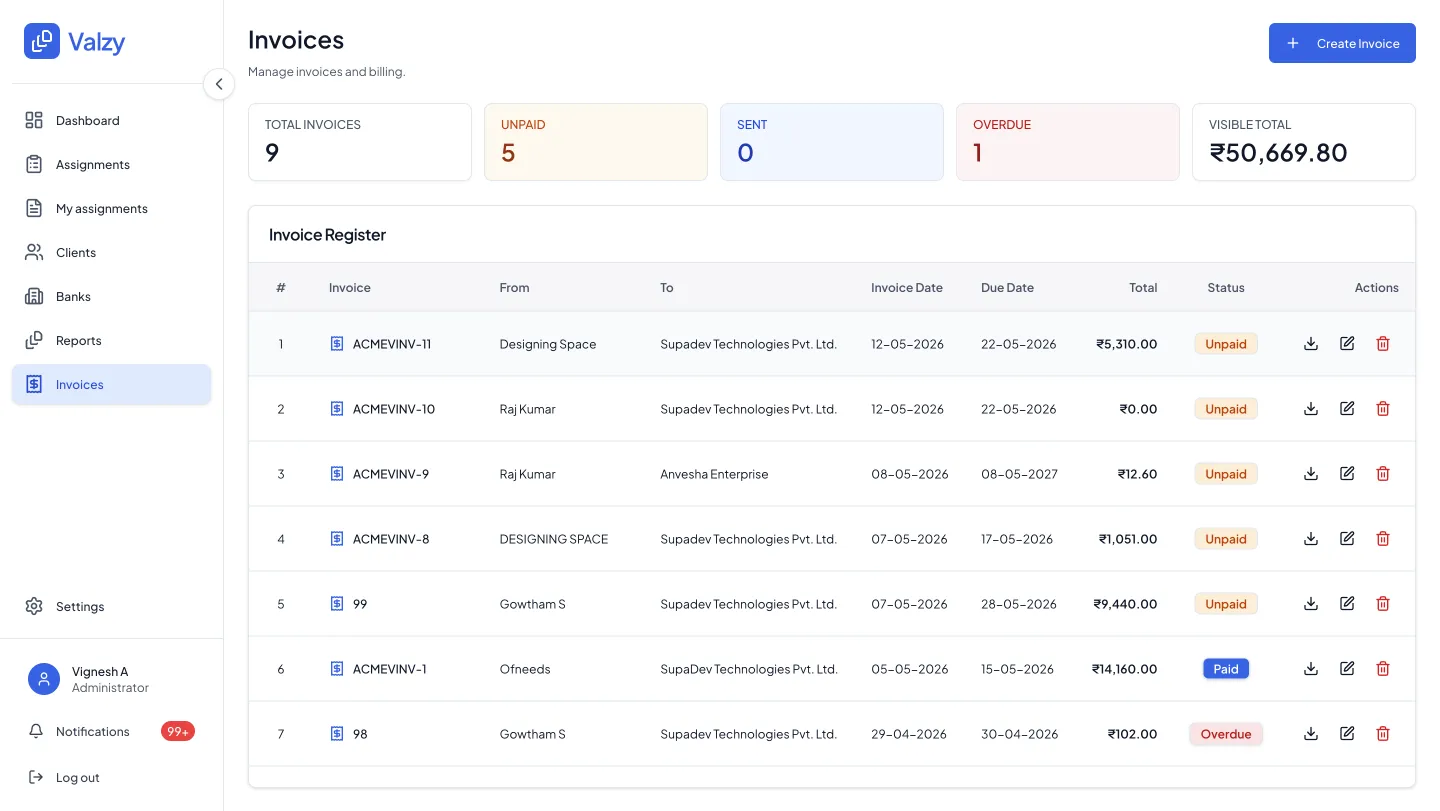
Invoice
Invoices raised on delivery, payments tracked.
Raise the invoice when the report goes out and see what is unpaid, sent or overdue across every bank.
- Invoice on report delivery
- Unpaid, sent and overdue at a glance
- Every bank in one register
Step by step
The bank valuation report process, in 12 steps.
What you do at each step, and what Valzy does for you.
| Step | You | Valzy |
|---|---|---|
| 1. Receive the assignment | Accept the bank’s request | Keeps every bank panel’s assignments in one queue |
| 2. Collect documents | Drop in the khata, sale deed or agreement | Reads the document and extracts land area, built-up area, PIN and age |
| 3. Locate the property | Confirm the suggested location | Places the property on the map from the document |
| 4. Study the locality | Note anything that needs a site check | Measures roads, water bodies, high-tension lines and nearby projects |
| 5. Find the guideline value | Confirm the rate | Finds the SR rate and opens the guideline document |
| 6. Pick comparables | Swap in your own evidence if needed | Picks the closest matches and removes outliers |
| 7. Adjust and value | Make the judgement calls | Applies adjustments and works out land and building value |
| 8. Visit the site | Inspect, or send a field engineer | Sends the visit, captures photos and logs every step |
| 9. Summarise | Review value, pros and cons | Brings together values, demand and supply, and risks |
| 10. Fill the report | Pick the bank’s format | Pre-fills almost every field from the valuation |
| 11. Review and sign | Check the report and sign | Shows the source behind every figure |
| 12. Invoice | Send the report | Raises the invoice and tracks payment |
See the whole product on Valzy for valuers, or read our guide to choosing valuation report software.
FAQ
Questions valuers ask
How do you prepare a valuation report for a bank loan?
Receive the assignment, collect the property documents, locate the property, study the locality, find the guideline value, select and adjust comparables, value the land and building, inspect the site, then fill the bank’s report format and sign it. Valzy does the gathering and arithmetic at each step, so you focus on the judgement.
What are the steps in the property valuation process?
For a bank valuation, the steps run from assignment and documents through location, locality, guideline value, comparables, adjustments and land and building value, to the site visit, report and invoice. The table on this page sets out each step and what Valzy does in it.
Which documents does a valuer need?
Typically the sale deed or agreement, the khata or property card, and where relevant the encumbrance certificate, approved plan and tax receipts. Banks may ask for more. Valzy reads the documents you upload and links each extracted field to its page.
Does it support each bank’s report format?
Yes. Pick the bank’s format or your own template and Valzy pre-fills it from the valuation. You review it full screen and edit anything before sending.
Can my field engineers use it?
Yes. Send the site visit to a field engineer, who accepts it in the app, captures photos and measurements on site, and every step is logged on the assignment.
How can I try it?
Valzy for valuers is free for 10 days with 3 reports. IBBI-registered valuers are approved instantly when they sign up with the email address on their IBBI registration.
Your next bank report, with the groundwork done.
Try Valzy free for 10 days with 3 reports. IBBI-registered valuers are approved instantly.